Morse code is a communication system that uses dots and dashes to represent letters, numbers, and symbols. A Morse Code Translator converts normal text into Morse signals and decodes Morse code back into readable text within seconds.
Recent Translations
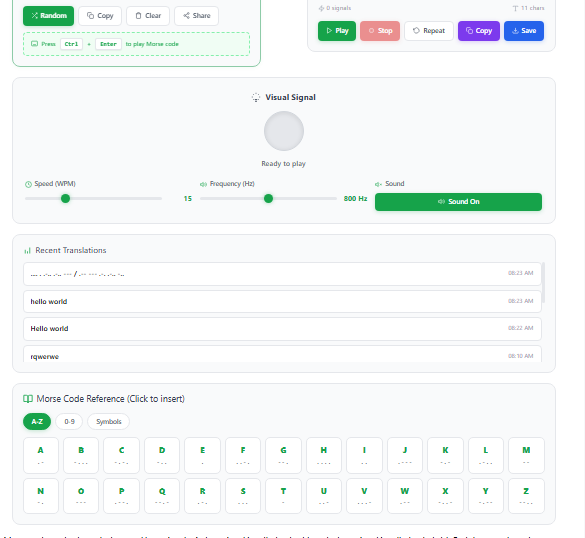
Morse Code Reference (Click to insert)
Morse code works through short and long signals. A short signal is called a dot (•), and a long signal is called a dash (–). Each letter and number follows a unique pattern. For example:
| Character | Morse Code |
|---|---|
| A | • – |
| B | – • • • |
| C | – • – • |
| 1 | • – – – – |
| SOS | • • • – – – • • • |
This signal system became one of the earliest forms of binary communication. The code uses only two signal states: signal on and signal off. That simple structure made Morse code reliable for long-distance messaging.
Morse Code Letters
A modern morse code translator online tool handles both signal encoding and signal decoding instantly. Users can type text to generate Morse code or paste Morse code to translate it into readable language.
History of Morse Code and the Telegraph System
Morse code started in the 1830s during the rise of the telegraph system. American inventor Samuel Morse helped create the system to send messages over electrical wires. Telegraph operators used electrical pulses to send dots and dashes across long distances. This process changed communication speed at the time. Messages that once took days could travel within minutes. Later, Morse code became part of CW communication, which stands for continuous-wave radio communication. Radio operators transmitted Morse signals through sound tones and radio signals instead of wires. This method became common in ships, military units, and aviation systems.
During wartime, Morse code supported secure and fast communication. Military teams used it for coded transmissions, emergency alerts, and field communication. Maritime crews relied on Morse code for distress calls at sea.
SOS Signal and Emergency Communication
The most famous Morse code message is SOS:
• • • – – – • • •
This emergency signal became a global standard for distress communication. Ships and rescue teams used it during emergencies when voice communication failed. Morse code remained effective in harsh conditions. Radio operators could send signals through weak transmissions, poor weather, or damaged equipment. That reliability helped save lives during maritime accidents and military emergencies. Many emergency systems still recognize Morse code today. Some pilots, sailors, and rescue workers continue to train with basic Morse patterns.
Modern Uses of Morse Code
Morse code still has practical and educational value. Ham radio operators use it for long-range communication, especially in low-bandwidth conditions. Many hobbyists enjoy Morse code for its history and technical challenge.
People use a morse code converter or morse code generator for several reasons:
- Sending secret or coded messages
- Practicing CW communication
- Studying telegraph history
- Creating Morse audio tones
- Training for amateur radio exams
- Understanding signal encoding systems
Many students and tech enthusiasts use Morse code to study early communication methods. It gives a simple example of how digital signals and modern data transmission work.
Translate Text to Morse Code Instantly
Experience fast and accurate Morse code conversion with our advanced Morse Code Translator. No installation or registration required—simply enter your message and receive immediate results. Whether you’re searching for “hello in Morse code,” decoding radio signals, or learning the Morse communication system, this tool provides reliable translations based on the original Morse code standard.
Enter Text or Morse Code
Type your message into the translator field or paste existing Morse code symbols. The converter supports both English text and Morse code input, making two-way translation quick and effortless.
Get Real-Time Morse Code Conversion
See your message transformed instantly into Morse code patterns. Every character is accurately converted into its corresponding dots (•) and dashes (—), ensuring precise and dependable results.
Hear Authentic Morse Code Signals
Play translated messages as traditional Morse code audio signals. You can also activate visual light flashes to better understand how Morse code was historically transmitted across long distances using telegraph and signal systems.
Whether you’re a student, radio operator, emergency preparedness enthusiast, or simply curious about Morse communication, this translator offers an efficient way to encode, decode, and learn Morse code online.
How the Morse Code Translator Works
A Morse Code Translator converts regular text into Morse code and decodes Morse signals back into readable text instantly. Users can type words, paste Morse symbols, or use audio and light features for fast signal encoding and decoding.
Simple Input and Instant Translation
The tool uses a clean and interactive interface that works directly in the browser. Users do not need downloads, setup steps, or technical skills.
The translation process usually follows these steps:
- Select the conversion mode:
- Text → Morse Code
- Morse Code → Text
- Enter text or Morse code into the input box.
- View the translated output instantly in the result area.
Example Workflow
| Action | Result |
|---|---|
| Type “HELLO” | Displays “•••• • •–•• •–•• –––” |
| Paste Morse code | Converts symbols into readable text |
| Press Play | Outputs Morse audio tones |
| Enable Flash Mode | Sends signals through blinking light |
Text to Morse Code and Morse to Text Conversion
The translator supports two-way communication. Users can create Morse signals from normal text or decode dots and dashes into plain language.
Text to Morse Code
In this mode, the system converts letters, numbers, and punctuation into Morse patterns. Each character follows standard Morse timing rules.
For example:
| Text | Morse Code |
|---|---|
| SOS | ••• ––– ••• |
| RADIO | •–• •– –•• •• ––– |
| 123 | •–––– ••––– •••–– |
Morse to Text
This mode performs signal decoding. Users can paste Morse sequences with spaces between letters and words. The tool reads the patterns and converts them into readable text instantly.
This process supports:
- Dots and dashes
- Word spacing
- Standard Morse formatting
- Fast online decoding
Real-Time Audio and Flash Signal Features
Many advanced tools include audio playback and visual signal support. These features make Morse practice more interactive.
Morse Code Tools & Games
Audio Playback
Users can press the play button to hear Morse tones. The system produces short and long beeps that match Morse timing rules.
Some tools allow users to adjust:
- WPM (Words Per Minute) speed
- Audio pitch or frequency
- Tone length
- Pause timing between letters
Flashing Light and Live Signal Decoding
Some Morse code tools support visual flashing signals. The screen or flashlight blinks according to Morse timing patterns. This feature copies emergency signaling methods used in military communication and rescue situations.
A few advanced platforms support:
- Microphone-based Morse detection
- Live sound decoding
- Keyboard tap input
- Visual signal recognition
- Image-based Morse decoding
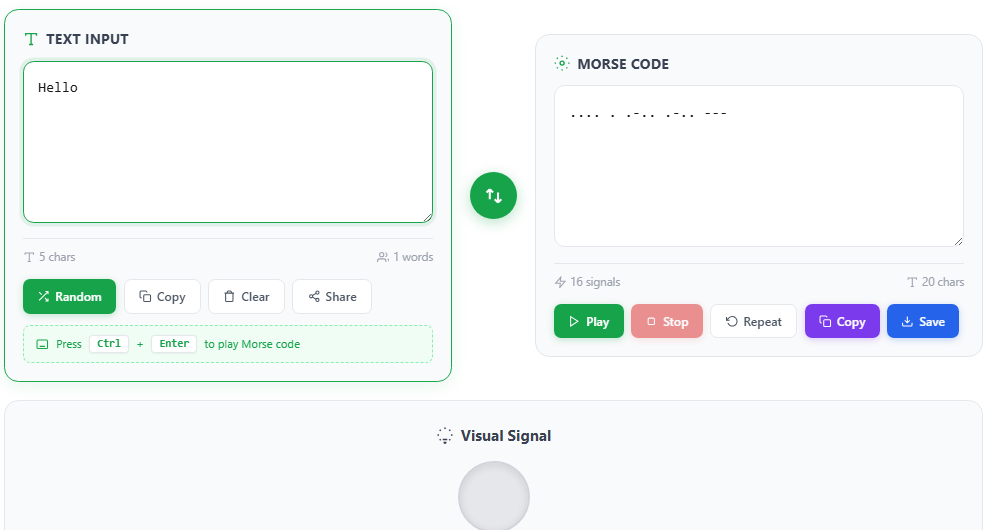
Morse Code Translator Interface Example
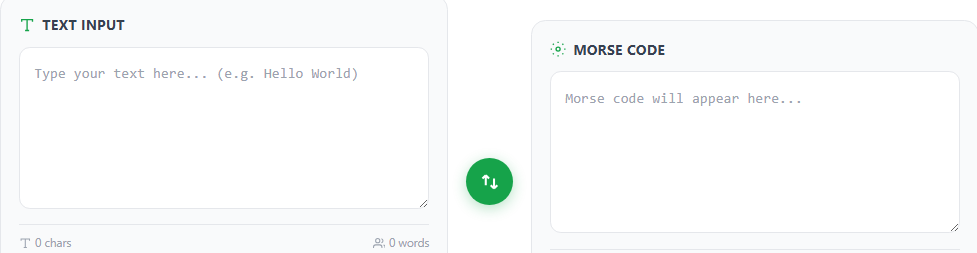
Caption: Enter text in the left box and receive Morse code output instantly with optional sound and flashing light feedback.
Convert Text to Morse Code Online
Enter or paste any text into the Text Input field, and the Morse Code Translator will instantly generate the corresponding Morse code sequence. Your message is accurately converted into a series of dots (•) and dashes (–), which appear in the Morse Code Output section in real time. The converter supports the complete Morse code alphabet, including letters (A–Z), numbers (0–9), and widely used punctuation symbols. Whether you’re encoding messages, learning Morse code patterns, or practicing communication techniques, this tool provides fast, reliable, and precise text-to-Morse code conversion.
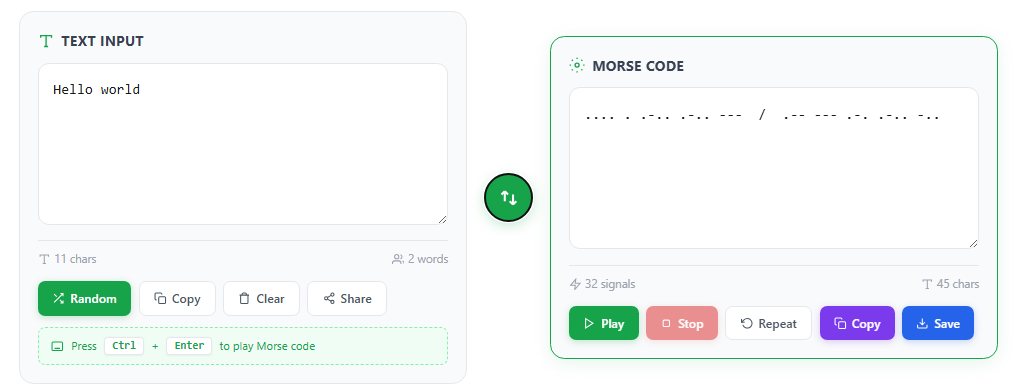
Decode Morse Code to Text Instantly
Switch the translation mode using the ⇆ toggle button to convert Morse code back into readable text. Simply paste your Morse code sequence into the input field, and the translator will automatically decode each pattern into its corresponding letters and words. For accurate results, separate individual letters with a single space and use a forward slash ( / ) to indicate word breaks. This feature is ideal for interpreting Morse code received through audio signals, flashing lights, radio communication, telegraph transmissions, or written Morse code messages.
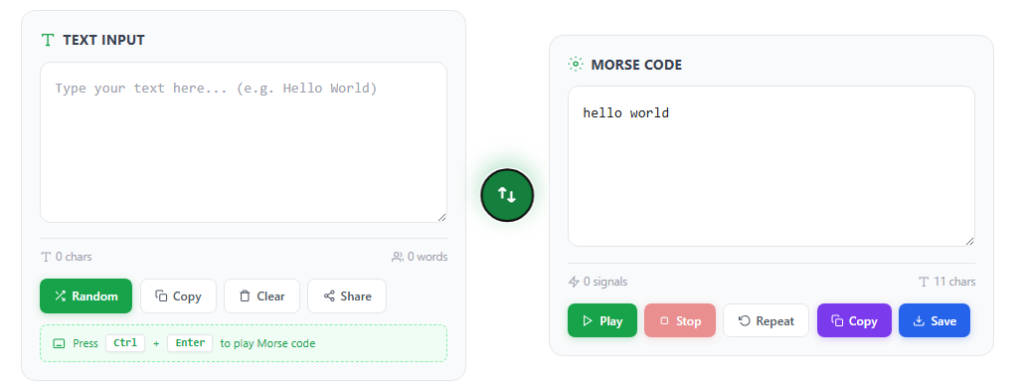
Copy, Share, and Use Morse Code Anywhere
Quickly save and distribute your translations with the built-in Copy and Share features. Both the text and Morse code output fields include a one-click Copy button, allowing you to instantly transfer encoded or decoded content to your clipboard. Use the copied text in emails, documents, social media posts, messaging apps, or educational projects. The Share option makes it easy to send Morse code translations directly to friends, colleagues, or online communities, streamlining communication and collaboration across multiple platforms.
Generate Random Morse Code Practice Messages
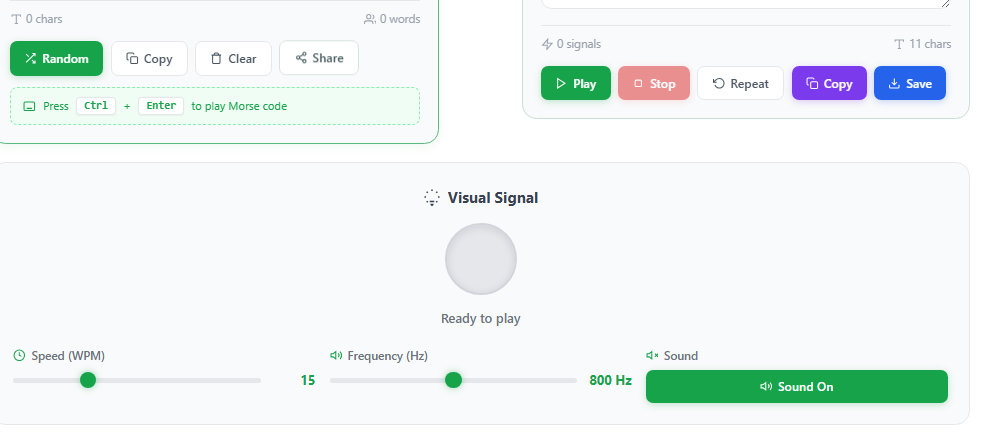
Enhance your learning experience with the Random Message Generator. By clicking the Random button, the tool instantly creates random text phrases or Morse code sequences for practice and training. This feature is perfect for improving Morse code recognition, strengthening decoding skills, memorizing character patterns, and testing translation accuracy. Whether you’re a beginner learning the Morse code alphabet or an experienced operator refining your speed, random message generation provides an effective way to practice in real-world scenarios.

Listen to Morse Code Audio Signals
Transform your Morse code messages into authentic audio signals with the Play feature. Each dot (•) is represented by a short tone, while each dash (—) produces a longer beep, following standard Morse code timing rules. Use the Stop button to pause playback at any time, or select Repeat to replay the message continuously for listening practice. This audio playback feature is ideal for improving Morse code recognition, developing listening skills, and mastering signal interpretation through sound.
Visual Morse Code Light Signals
Enable the Light Playback option to display Morse code as a synchronized flashing light sequence. The visual signal accurately mirrors the audio output, with short flashes representing dots and longer flashes representing dashes. This interactive learning feature helps users understand Morse code timing, spacing, and rhythm while simulating real-world communication methods used in signal lamps, emergency communication, maritime operations, and amateur radio training. Combining audio and visual feedback creates a more effective and engaging Morse code learning experience.
Advanced Morse Code Settings and Audio Customization
Personalize your Morse code experience with the Configure panel, which provides a range of advanced playback and display options. These settings allow you to tailor audio signals, transmission speed, and visual output to suit your learning goals, practice sessions, or professional communication requirements.
Available Configuration Options
Sound Mode
Select your preferred audio style, including a traditional Telegraph Sounder or a CW (Continuous Wave) Radio Tone for an authentic Morse code transmission experience.
Tone Frequency (Hz)
Adjust the pitch of the Morse code signal to a comfortable listening level. Common settings such as 550 Hz are ideal for both beginners and experienced operators.
Volume Control
Customize playback loudness with a flexible volume range from 0 to 100, ensuring clear audio in any environment.
Transmission Speed (WPM)
Set the sending speed in Words Per Minute (WPM). Lower speeds help beginners learn Morse code, while higher speeds support advanced training and real-world communication practice.
Farnsworth Timing
Improve comprehension with Farnsworth Speed, which increases spacing between characters and words while preserving normal character rhythm. This method is widely used for Morse code training and skill development.
Word Separator Display
Enable or disable the “/” word separator in Morse code output to improve readability and make encoded messages easier to interpret.
Real-Time Character and Signal Counters
Monitor your progress with built-in character and signal counters displayed beneath the translation fields. These counters update instantly as you type or decode messages, showing the total number of characters and Morse code signals in your transmission. This feature is useful for practice exercises, message length tracking, and communication scenarios with transmission limits.
Learn the Morse Code Alphabet, Numbers, and Symbols
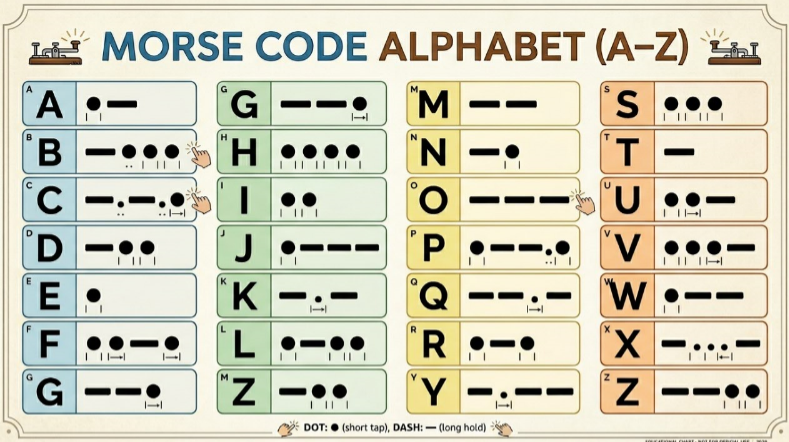
Mastering Morse code starts with understanding its core building blocks: letters, numbers, and punctuation symbols. This timeless communication system uses unique combinations of dots (•) and dashes (—) to represent every character. By learning these patterns, you can quickly encode and decode messages, improve your signal recognition skills, and gain a deeper understanding of one of the most influential communication methods ever developed.
Morse Code Words
Whether you’re studying Morse code for amateur radio, emergency preparedness, aviation, maritime communication, military history, or personal interest, learning the alphabet and symbol chart is the foundation for becoming proficient in Morse code translation and communication.
Morse Code Alphabet
Morse Code Numbers
Morse Code Punctuation and Special Symbols
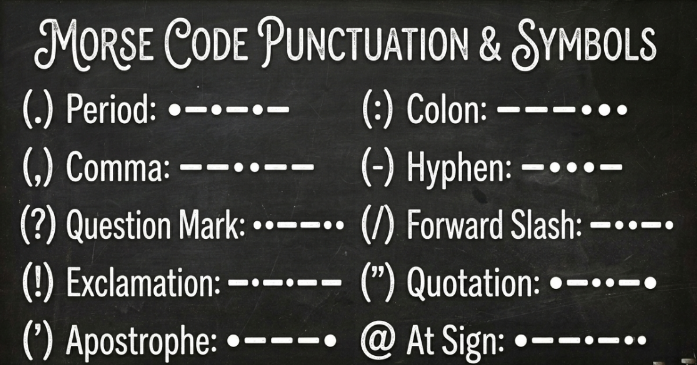
In addition to letters and numbers, Morse code includes a variety of punctuation marks and special symbols used in communication, message formatting, and signal transmission. Learning these patterns can improve your Morse code accuracy and help you decode complete messages with confidence.
Common Morse Code Punctuation
| Symbol | Morse Code |
|---|---|
| Period (.) | • — • — • — |
| Comma (,) | — — • • — — |
| Question Mark (?) | • • — — • • |
| Apostrophe (‘) | • — — — — • |
| Slash (/) | — • • — • |
| Parentheses ( ) | — • — — • — |
| Colon (:) | — — — • • • |
| Semicolon (;) | — • — • — • |
Morse code punctuation is essential for reading and transmitting complete sentences, questions, dates, and structured messages. These symbols are commonly used in amateur radio communication, telegraph systems, emergency signaling, and Morse code training exercises.
For a complete visual reference, explore our Morse Code Alphabet Chart, featuring letters, numbers, punctuation marks, and special characters in an easy-to-read format. The chart is ideal for beginners, students, radio operators, and anyone looking to practice Morse code efficiently. It can also be printed for offline study and quick reference during training sessions.
Why Instant Translation Matters
Fast conversion improves usability and keeps communication smooth. Users can test Morse patterns, study signal timing, or send coded messages within seconds.
A free morse code generator with instant translation gives users:
- Quick signal encoding
- Accurate Morse decoding
- Real-time audio feedback
- Browser-based access on any device
- Smooth learning and practice experience
Key Features and Benefits
A modern Morse Code Translator gives users fast and accurate signal conversion without complicated setup steps. The tool combines instant translation, audio playback, and visual learning modes in one simple interface.
Why This Morse Code Translator Stands Out
This online translator supports both beginners and experienced Morse code users. The clean interface, real-time conversion, and multi-device support make daily use simple and efficient.
Free and Easy to Use
- 100% free with no signup required
- No software installation or browser extension needed
- Works directly in the browser
- One-click copy option for quick sharing
- Fast result download for saved Morse messages
- Clean layout with beginner-friendly controls
Users can start converting text into Morse code within seconds.
Bi-Directional Morse Code Conversion
The tool works in both directions for complete signal encoding and signal decoding.
Supported Conversion Modes
| Mode | Function |
|---|---|
| Text → Morse | Converts normal text into dots and dashes |
| Morse → Text | Decodes Morse symbols into readable text |
This dual-function setup makes the morse code converter useful for:
- Morse practice
- Ham radio communication
- Secret messages
- CW signal training
- Emergency signaling
Learn Morse Code Faster by Recognizing Patterns
One of the most effective ways to learn Morse code is to focus on character patterns rather than memorizing every symbol individually. Understanding how letters and numbers are structured can significantly improve your speed, accuracy, and long-term retention.
Start with the Simplest Characters
The easiest Morse code letters contain only a single signal:
- E (•) – the shortest Morse code character
- T (—) – the simplest dash-based character
Learning these foundational symbols first makes it easier to build confidence and recognize more complex patterns.
Identify Repeating Signal Patterns
Many Morse code characters follow predictable sequences that are easy to remember through repetition:
- S (•••) – three consecutive dots
- H (••••) – four consecutive dots
These rhythmic patterns are commonly used in Morse code practice because they are simple to recognize by both sight and sound.
Learn Opposite and Complementary Characters Together
Certain Morse code letters are closely related and can be memorized as pairs:
- A (•—) and N (—•)
- I (••) and M (——)
Studying these mirrored patterns helps reinforce character recognition and accelerates the learning process.
Numbers
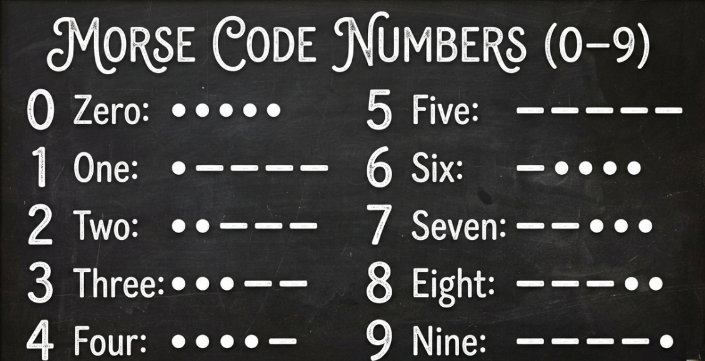
Morse code numbers follow a logical structure that makes them easier to memorize than many beginners expect:
- Lower numbers generally begin with more dots.
- Higher numbers generally begin with more dashes.
- Each number contains a total of five signals, creating a consistent pattern across the entire number set.
Once you understand these sequences, decoding numbers becomes much more intuitive and efficient.
Master Morse Code Punctuation
Morse code communication extends beyond letters and numbers. Punctuation marks allow you to create complete messages, ask questions, and improve readability.
For example:
- Question Mark (?) = ••——••
- Period (.) = •—•—•—
- Comma (,) = ——••——
Learning punctuation symbols is especially valuable for amateur radio operators, Morse code enthusiasts, and anyone practicing real-world message transmission.
By recognizing patterns, practicing common character groups, and understanding Morse code structure, you can learn Morse code more quickly and develop stronger encoding and decoding skills. With regular practice, Morse code becomes less about memorization and more about instantly recognizing familiar signal patterns.
Morse Code Alphabet Basics
The morse code alphabet uses combinations of dots (•) and dashes (–) to represent letters and numbers. Each character has a fixed pattern that stays the same across all communication systems.
Basic Examples
| Letter/Number | Morse Code |
|---|---|
| A | • – |
| B | – • • • |
| C | – • – • |
| E | • |
| S | • • • |
| 1 | • – – – – |
| 0 | – – – – – |
These patterns form the base of all Morse communication systems. Once learners understand the alphabet, decoding messages becomes easier.
Practice Tips for Beginners
A morse code converter makes learning easier by combining sound and visual learning.
Effective Practice Methods
- Start with slow audio playback
- Focus on 3–5 letters daily
- Repeat short words before long sentences
- Use flash or light mode for visual memory
- Increase WPM (words per minute) slowly over time
- Practice both encoding and decoding
Audio practice helps learners recognize timing between dots and dashes. Light mode builds visual memory through blinking patterns.
Common Morse Code Phrases
Beginners often start with simple and meaningful phrases. These help build confidence and recognition speed.
Examples
- SOS → ••• ––– •••
- I LOVE YOU → .. / .-.. — …- . / -.– — ..-
- HELP → …. . .-.. .–.
The SOS signal is widely known as an emergency call for help. It is simple, fast, and easy to recognize in stressful situations.
Consistent Daily Practice
Learning Morse code works best with short, regular sessions. Small daily goals create steady improvement.
Suggested routine:
- Learn 3–5 new characters daily
- Practice decoding simple words
- Repeat familiar phrases
- Test yourself with random messages
- Use flashcards or online tools
The morse code generator supports this process by offering instant feedback, making correction easy during practice.
Community and Real Practice
Many learners join ham radio groups or Morse code communities. These groups help users practice real communication and improve timing skills.
Community members often:
- Share practice challenges
- Exchange coded messages
- Train for CW communication exams
- Participate in radio contests
Real-Time and Adaptive Translation
The system gives instant feedback during typing. Users can enter letters, numbers, or Morse patterns and receive automatic conversion without delays.
Many advanced tools support:
- Adaptive timing controls
- Auto spacing correction
- Adjustable signal speed
- Beginner-friendly timing assistance
Audio Playback for Morse Timing Practice
The built-in morse code generator can play Morse signals through audio tones. Users hear the exact timing of dots and dashes, which improves listening skills and signal recognition.
Audio Features
- Play Morse code as sound
- Adjustable WPM (Words Per Minute)
- Custom tone frequency settings
- Repeat playback for practice
- Smooth CW communication simulation
Flashing Light and Visual Signal Mode
Visual mode converts Morse patterns into blinking light signals. Short flashes represent dots, and longer flashes represent dashes.
This feature helps users:
- Practice visual Morse recognition
- Send simple light signals
- Study emergency communication methods
- Understand Morse timing visually
Full Standard Morse Code Support
The translator supports all standard Morse characters, including:
- A–Z letters
- Numbers 0–9
- Common punctuation marks
- Standard spacing rules
Supported Characters Example
| Character Type | Example |
|---|---|
| Letters | A, B, C |
| Numbers | 1, 2, 3 |
| Symbols | ?, !, . , / |
Mobile-Friendly and Browser-Based
The morse code translator online tool works smoothly on:
- Smartphones
- Tablets
- Laptops
- Desktop browsers
How to Read and Write Morse Code
Morse code is a communication system that uses combinations of dots (•) and dashes (—) to represent letters, numbers, and symbols. By understanding the patterns and timing rules behind these signals, you can quickly learn how to decode Morse code messages and create your own encoded transmissions.
Whether Morse code is delivered through sound, flashing lights, radio signals, or written symbols, the process of reading and writing Morse code follows the same principles.
How to Read Morse Code (Decoding)
Decoding Morse code involves converting dots and dashes back into readable text. As you gain experience, recognizing common Morse code patterns becomes faster and more intuitive.
1. Identify the Signal Pattern
Each letter and number has a unique Morse code sequence.
Examples:
- H = ••••
- E = •
- L = •—••
- O = ———
By recognizing these combinations, you can gradually build complete words and sentences.
2. Understand Morse Code Spacing Rules
Correct spacing is essential for accurate decoding.
- 1 unit gap = Space between dots and dashes within the same character
- 3 unit gap = Space between individual letters
- 7 unit gap = Space between separate words
These timing rules help distinguish characters and prevent messages from becoming difficult to interpret.
3. Practice with Audio and Visual Signals
Morse code can be transmitted in several ways:
- Audio tones and beeps
- Flashing light signals
- Radio transmissions
- Tapping or vibration patterns
Regular practice trains your brain to recognize Morse code rhythms automatically, making decoding faster and more accurate over time.
How to Write Morse Code (Encoding)
Encoding Morse code is the process of converting text into a sequence of dots and dashes.
Step 1: Choose a Word or Message
Start with a simple word such as:
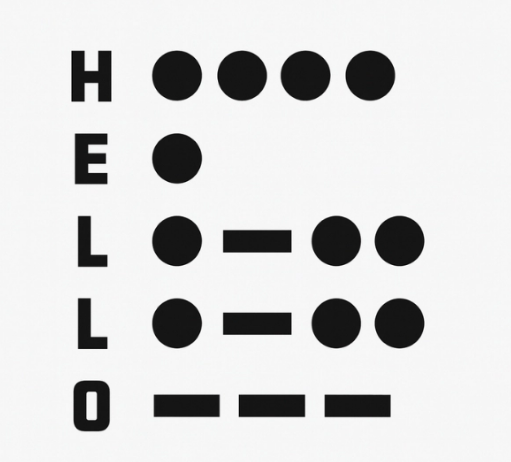
HELLO
Step 2: Convert Each Character
- H = ••••
- E = •
- L = •—••
- L = •—••
- O = ———
Step 3: Combine the Characters
The Morse code representation of HELLO becomes:
•••• • •—•• •—•• ———
Step 4: Follow Proper Spacing
Separate each character correctly to ensure the message can be decoded without confusion. For multiple words, use standard Morse code word spacing between each term.
Improve Your Morse Code Skills
The fastest way to learn Morse code is through consistent practice. Start with common letters, short words, and frequently used phrases before progressing to numbers, punctuation marks, and longer messages. Over time, you will begin recognizing Morse code patterns instantly, making both encoding and decoding much more efficient.
Combine Morse Code Characters with Correct Spacing
After converting each letter into Morse code, arrange the characters using proper spacing rules. Accurate spacing is essential because it helps distinguish individual letters and separate words within a message.
- Leave a short gap between dots and dashes that belong to the same character.
- Use a larger gap between letters.
- Add an even longer pause or separator between words.
Practice Morse Code with Light and Sound Signals
One of the best ways to learn Morse code is through hands-on practice using visual or audio signals. Try transmitting messages with a flashlight, signal lamp, speaker, or Morse code audio generator.
- Dot (•) = Short flash or brief beep
- Dash (—) = Long flash or extended beep
Learn the Famous SOS Distress Signal
A great beginner exercise is practicing the internationally recognized SOS distress signal:
SOS = ••• ——— •••
Because of its simple and symmetrical pattern, SOS is one of the easiest Morse code messages to remember and identify. It has been used worldwide in emergency situations and remains one of the most recognizable Morse code sequences ever created.
Common Uses and Applications
Morse code remains useful in communication, education, emergency signaling, and radio training. A modern Morse Code Translator helps users convert text into dots and dashes quickly for practice, messaging, and real-world signal communication.
Emergency Signals and SOS Communication
One of the best-known Morse code messages is the SOS signal:
••• ––– •••
This distress signal became a worldwide standard for emergencies at sea and in remote areas. People can send SOS using:
- Flashlights
- Radio signals
- Sound beeps
- Tapping signals
- Flashing screens
The simple structure of Morse code makes it reliable during emergencies. A person only needs short and long signals to communicate. That system works even when internet, mobile networks, or advanced devices fail.
Common Emergency Signaling Methods
| Signal Method | Morse Code Use |
|---|---|
| Flashlight | Visual SOS signaling |
| Sound Beeps | Audio distress messages |
| Radio Signals | Long-distance emergency calls |
| Tapping | Silent communication |
Educational and STEM Learning Activities
Many schools and hobby groups use Morse code to teach communication basics and signal systems. Teachers often use a morse code converter during STEM activities to explain how binary-style communication works.
Students can:
- Translate names into Morse code
- Practice dots and dashes
- Study signal timing
- Build simple telegraph circuits
- Create light-based Morse projects
These activities make coding concepts easier for younger students. Morse code shows how simple signal patterns can carry complex information.
Ham Radio and CW Communication
Ham radio operators still use Morse code in daily communication. In radio systems, Morse code is called CW (Continuous Wave) communication. CW signals travel long distances with low power, making them useful in weak signal conditions. Radio hobbyists often train their hearing speed through repeated Morse listening practice.
A morse code translator online tool helps radio users:
- Practice CW timing
- Decode radio signals
- Increase sending speed
- Improve listening accuracy
- Test Morse audio playback
Historical and Telegraph Interest
History enthusiasts use Morse code to study early communication systems from the telegraph period. Morse code played a major role in:
- Telegraph messaging
- Maritime communication
- Railway systems
- Military communication
- Early aviation radio systems
Collectors and researchers sometimes decode vintage telegrams and historical radio messages. Some people study famous events connected to Morse communication, including wartime radio traffic and ship distress calls from the telegraph age.
Personal Messaging and Creative Uses
Many people use Morse code for private or creative communication. Dots and dashes appear in:
- Jewelry designs
- Tattoos
- Secret notes
- Gift messages
- Puzzle games
Universal Communication Without Advanced Technology
Morse code works with nearly any signal source. Users can communicate through:
- Light flashes
- Hand taps
- Audio tones
- Radio waves
- Simple electronic switches
That flexibility makes Morse code one of the most universal forms of binary communication. A signal only needs two states: short and long, or on and off.
Master Morse Code Rhythm and Timing
One of the most important skills in Morse code communication is understanding rhythm and timing. Experienced operators rarely count individual dots and dashes. Instead, they recognize the unique sound patterns and cadence of each character. Developing this sense of rhythm can significantly improve your Morse code speed and accuracy.
Understanding Morse Code Timing
Every Morse code signal follows standardized timing rules:
- Dot (•) = 1 time unit
- Dash (—) = 3 time units
- Space between elements of a character = 1 time unit
- Space between letters = 3 time units
- Space between words = 7 time units
Learning these timing principles helps you decode Morse code more naturally and transmit messages with proper spacing and clarity.
Train Your Ear to Recognize Patterns
Rather than counting every signal, focus on the overall rhythm of the character. Over time, your brain will begin identifying Morse code patterns automatically, similar to recognizing familiar melodies or spoken words.
This approach is widely used by amateur radio operators, Morse code enthusiasts, and communication professionals to increase proficiency and listening speed.
Common Morse Code Words for Practice
| Word | Morse Code |
|---|---|
| SOS | ••• ——— ••• |
| HI | •••• •• |
| HELP | •••• • •—•• •——• |
| LOVE | •—•• ——— •••— • |
| HELLO | •••• • •—•• •—•• ——— |
These simple examples are excellent for practicing Morse code recognition, rhythm, and transmission techniques.
Improve Through Repetition
Practice speaking, tapping, flashing, or listening to Morse code messages regularly. Consistent repetition helps reinforce timing patterns and builds muscle memory, making it easier to read and send Morse code without consciously translating every character. As your skills improve, you’ll begin recognizing entire words and phrases by their rhythm alone, transforming Morse code from a series of symbols into a natural communication method.
Start with simple letters (E, T, A, N) and common words (HI, HELP, OK). Use online tools or apps like our Morse Code Translator to test your decoding and timing skills. You can even send messages to friends using flashlights at night! Just make sure they know Morse first!
Morse Code Sounds: The Rhythm Behind Every Signal
Morse code is much more than a collection of dots and dashes. It is a communication system built on rhythm, timing, and sound. Long before modern messaging apps and digital networks existed, Morse code audio signals carried important messages across continents, oceans, and radio frequencies using nothing more than carefully timed tones.
Today, learning Morse code through sound remains one of the fastest and most effective ways to develop decoding skills and improve signal recognition.
The Building Blocks of Morse Code Audio
Every Morse code message is created using two basic signal types:
- Dot (•) – A short audio tone or beep.
- Dash (—) – A longer tone that lasts approximately three times longer than a dot.
By combining these two simple elements, Morse code can represent every letter, number, and punctuation mark in the alphabet.
For example:
- E = •
- T = —
- S = •••
- O = ———
When these characters are combined, they create recognizable audio patterns that experienced operators can identify instantly.
Why Morse Code Sounds Are Easy to Recognize
Each Morse code character has a unique rhythm. Rather than memorizing individual dots and dashes, many learners focus on the overall sound pattern.
For example, the famous distress signal:
SOS = ••• ——— •••
creates a distinctive sequence of short tones followed by long tones and then short tones again. This memorable rhythm is one reason SOS became one of the most recognizable emergency signals in history.
As you continue practicing, you’ll begin identifying entire letters and words by sound alone, without consciously translating every symbol.
Listen to Morse Code in Action
When you enter a word into a Morse Code Translator and activate audio playback, the text is transformed into a sequence of timed beeps.
For example, the word HELLO becomes:
- H = ••••
- E = •
- L = •—••
- L = •—••
- O = ———
Instead of reading symbols on a screen, you hear a structured pattern of tones and pauses. This auditory learning method helps reinforce character recognition and improves Morse code fluency over time.
The Importance of Morse Code Timing
Accurate timing is essential for successful Morse code communication. Every signal follows internationally recognized timing rules:
- Dot (•) = 1 time unit
- Dash (—) = 3 time units
- Space between signal elements = 1 time unit
- Space between letters = 3 time units
- Space between words = 7 time units
These timing intervals create the rhythm that allows listeners to distinguish one character from another. Without proper spacing, Morse code becomes difficult to interpret.
Learn Morse Code by Sound
Many experienced radio operators recommend learning Morse code through audio rather than visual memorization. Listening training develops faster recognition skills and mirrors real-world communication conditions.
To improve your Morse code listening abilities:
- Start with short and familiar words.
- Practice listening to common letters daily.
- Use audio playback features regularly.
- Tap the rhythm with your fingers to reinforce timing.
- Challenge yourself to identify characters before viewing the translation.
Consistent practice helps train your brain to recognize Morse code patterns naturally and efficiently.
From Telegraph Signals to Modern Learning Tools
For more than a century, Morse code has connected people across vast distances. It has been transmitted through telegraphs, radio equipment, signal lamps, emergency beacons, and even tapping systems. The simplicity of Morse code continues to make it one of the most fascinating communication methods ever created.
With a modern Morse Code Translator, you can instantly convert text into Morse code audio, listen to authentic signal patterns, and develop practical decoding skills. By focusing on rhythm, timing, and repetition, you’ll quickly discover that Morse code is not just a language of symbols—it’s a language of sound.
Why Choose Our Morse Code Translator?
Our Morse Code Translator is designed to provide fast, accurate, and reliable text-to-Morse and Morse-to-text conversion for learners, hobbyists, radio operators, and communication enthusiasts.
Fast and Accurate Translation
Convert text into Morse code instantly or decode Morse signals back into readable text with high accuracy. The translator supports letters, numbers, punctuation marks, and special characters for comprehensive message conversion.
Beginner-Friendly Interface
The clean and intuitive design makes Morse code translation simple for users of all skill levels. Whether you’re learning Morse code for the first time or practicing advanced communication techniques, the tool is easy to use on desktop and mobile devices.
Audio and Visual Morse Code Playback
Listen to authentic Morse code tones and view synchronized flashing light signals to improve recognition, timing, and decoding skills. This interactive approach helps users learn Morse code faster through both visual and auditory feedback.
Customizable Learning Experience
Adjust transmission speed, audio pitch, volume, Farnsworth timing, and display settings to match your training goals. These customization options make the translator suitable for beginners and experienced operators alike.
Free, Secure, and Accessible
Use the Morse Code Translator anytime without downloads, registration, or complicated setup. Enjoy quick access to reliable Morse code conversion whenever you need it.
Fun Facts About Morse Code
Morse code has played a major role in the history of communication and continues to fascinate people around the world.
The First Morse Code Message
The first official Morse code message was sent by Samuel Morse in 1844. The message famously read:
“What hath God wrought?”
This historic transmission demonstrated the potential of long-distance electronic communication.
SOS Is the World’s Most Recognized Morse Signal
The famous distress signal:
SOS = ••• ——— •••
was chosen because its pattern is simple, symmetrical, and easy to recognize in poor transmission conditions. Contrary to popular belief, SOS is not an abbreviation for specific words.
Morse Code Was Used Around the Globe
For more than a century, Morse code served as a primary method of communication for telegraph operators, maritime crews, military personnel, aviation services, and radio operators.
Morse Code Can Be Sent in Many Ways
Messages can be transmitted using:
- Audio tones and beeps
- Flashing lights
- Radio signals
- Taps and vibrations
- Visual signaling devices
Learning Morse Code Improves Pattern Recognition
Because Morse code relies on rhythm, timing, and signal patterns, many learners find that practicing Morse code helps strengthen concentration, listening skills, memory, and attention to detail.
Morse Code Remains Relevant Today
Although modern communication technologies have largely replaced telegraph systems, Morse code is still used by amateur radio operators, emergency preparedness enthusiasts, educators, and hobbyists around the world. More than 180 years after its invention, Morse code continues to demonstrate how a simple system of dots and dashes can connect people across great distances.
FAQs – Morse Code Translator Online
A Morse Code Translator helps users convert text into dots and dashes and decode signals instantly. Below are common questions users ask about Morse code, audio signals, light flashes, and real-time translation.
How fast can Morse code be learned?
Learning speed depends on daily practice and consistency. Most beginners start recognizing basic letters within a few days using a morse code converter with audio playback.
With regular practice:
- Basic letters can be learned in 3–5 days
- Short words take 1–2 weeks to recognize
- Fluent reading may take a few months
Using audio signals helps the brain memorize timing patterns more naturally. A slow WPM (words per minute) setting is best for beginners. Gradually increasing speed improves recognition of CW communication patterns.
What is SOS in Morse code?
The SOS signal is one of the most important Morse code patterns:
… — …
It represents a universal emergency distress call used in radio signals and maritime communication. It is simple, fast, and widely recognized across the world.
Originally used in early telegraph systems, SOS became a global standard for emergency signaling. It is still used today in survival training and rescue operations.
SOS can be transmitted using:
- Sound beeps
- Radio transmissions
- Flashlight signals
- Tapping patterns
Can Morse code be used for audio signals?
Yes, Morse code works very well with audio signals. A morse code translator online can convert text into beeping tones that represent dots and dashes.
This method helps users:
- Train listening skills
- Practice CW timing
- Recognize signal patterns
- Improve decoding speed
Yes, international Morse code is a standardized system used across many countries. It allows consistent communication through binary communication signals: short and long tones or flashes.
Is Morse code universal?
This universal system supports:
- Radio communication
- Emergency messaging
- Maritime signaling
- Aviation training
Can Morse code be transmitted using light?
Yes, Morse code can be sent using light flashes. A flashlight, lamp, or screen can represent dots and dashes through short and long blinking signals.
This method is useful for:
- Emergency signaling
- Night communication
- Outdoor survival situations
A morse code generator helps users visualize timing rules for light-based transmission. Short flashes represent dots, while longer flashes represent dashes.
Do I need to install anything to use this translator?
No installation is required. The online converter runs directly in the browser on phones, tablets, and computers.
Users can:
- Type text and convert instantly
- Decode Morse code without setup
- Use audio playback and light modes
- Access the tool anywhere with internet